Episode 55 - Esri Releases Agent Builder tools in the ArcGIS SDK for JavaScript 5.0
I built a web app called Palm Springs Eats AI, where you can chat with a map of restaurants near the convention center.
Prologue
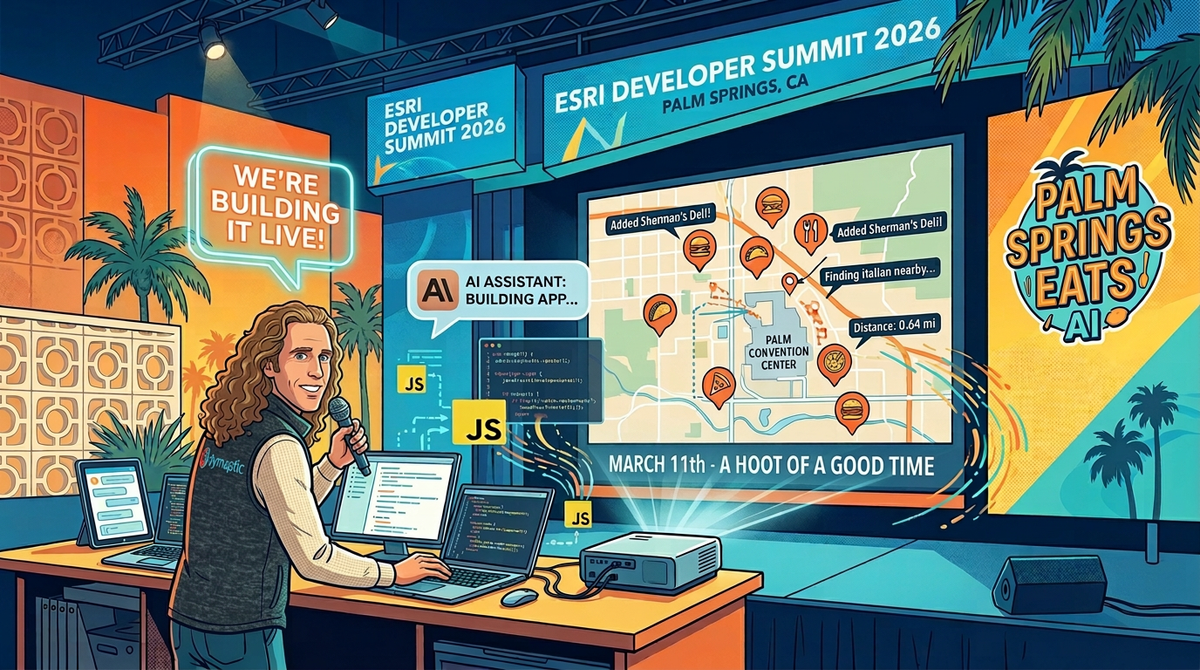
Next week, I’ll be in Palm Springs, California, for the Esri Developer and Technology Summit. If you’re going too, come say hi! I’m giving a talk on Wednesday where we are going to have Claude build us an app in an hour, and I’m just going to narrate it, David Attenborough style.

Esri has been busy releasing things leading up to the conference, from ArcGIS Online updates to the ArcGIS Maps SDK for JavaScript 5.0 (JS SDK 5.0) The latter includes many new features, but the addition of agentic mapping application components is what I am most interested in. I decided to take those for a test drive last week, so here we go!
TL;DR — I built a web app called Palm Springs Eats AI, where you can chat with a map of restaurants near the convention center. The built-in AI agents (provided by Esri) handle navigation and data exploration. I added a custom agent that lets you add new restaurants through conversation. This post has a lot of code; if you want to skip to the conclusion, feel free.
Eatalogue
This all started with a list of recommended restaurants that we got from some Palm Springs locals at the last conference. That’s great, but we can make it more useful; at the very least, we can put them on a map!
Maps are great interfaces, but sometimes you need search or a list view, so I thought, what if we could simply chat with the map? We could search for things, like “what burger places are near the convention center,” or we could add locations, like “Add Sherman’s Deli at …” and it could geocode the location, map my words into the fields, and update a feature service! Now we have a project!
What Esri Actually Shipped
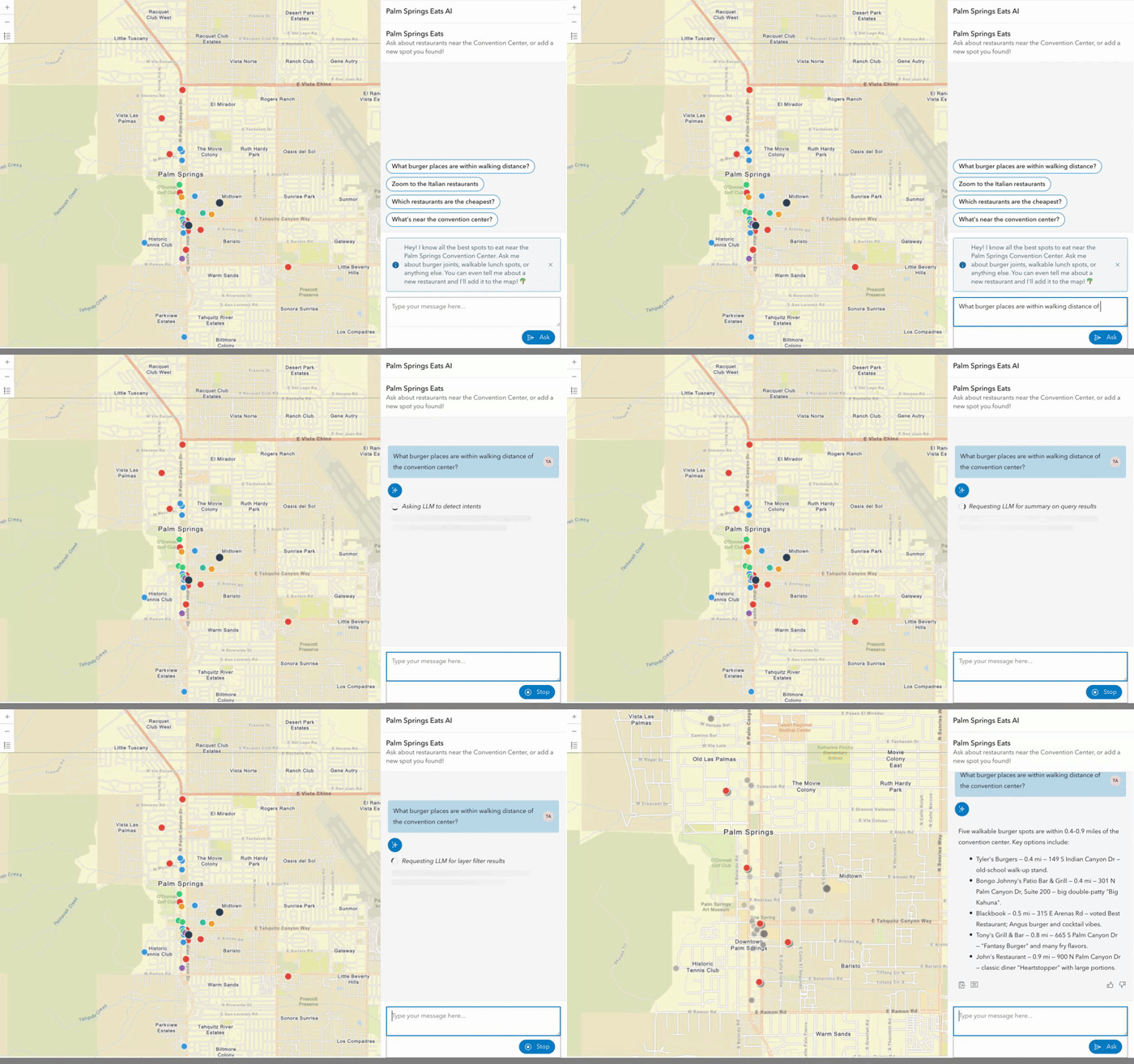
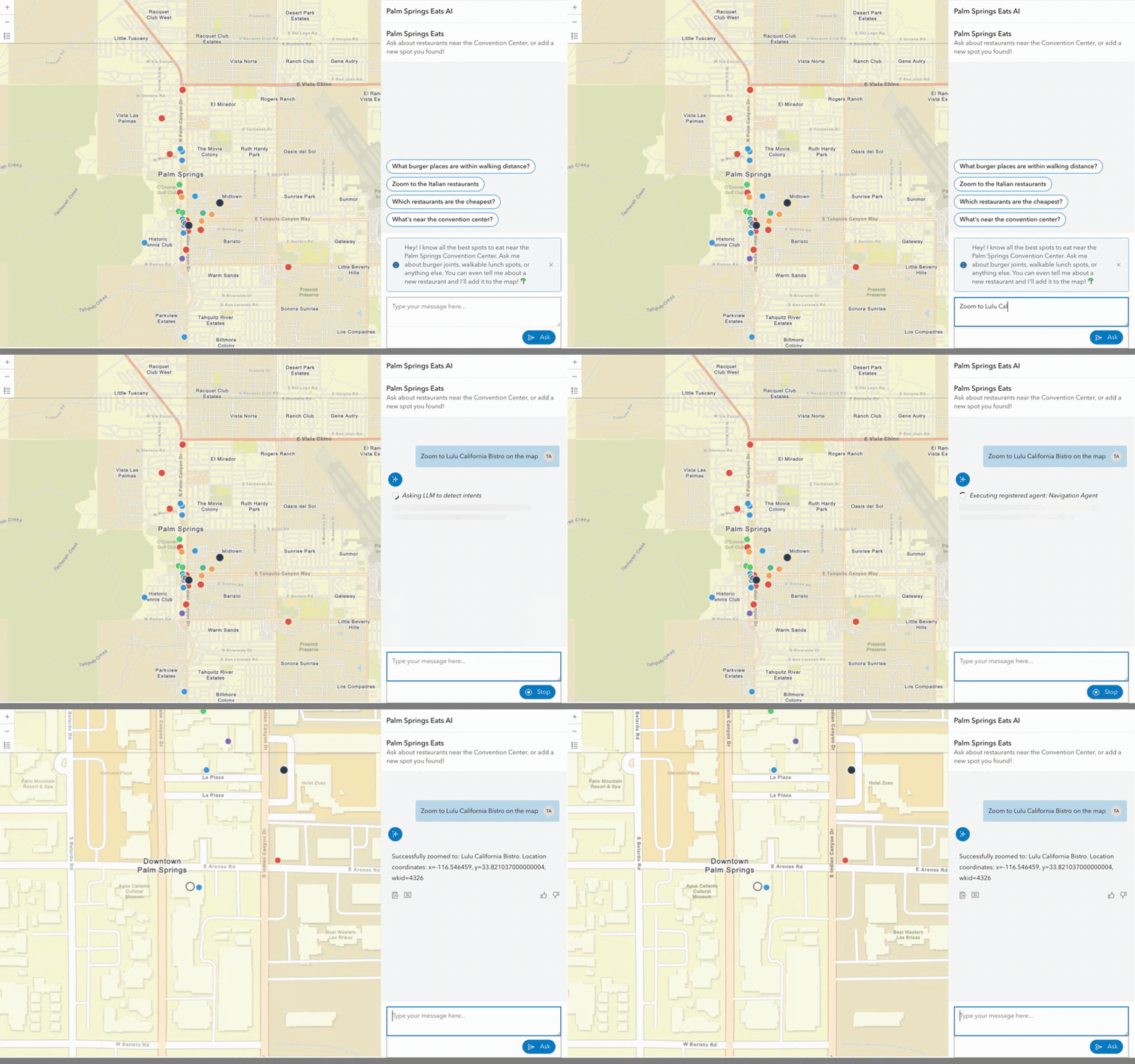
The JS SDK 5.0 dropped in January with a set of AI components (still in beta). Everything in the SDK is now a web component. You simply drop them into your HTML, and you get a chat panel that can navigate ("zoom to the Italian restaurants"), explore data ("which are the cheapest?"), and provide help ("what can I ask about this map?").
Under the hood, the SDK uses LangGraph. It routes your natural language through an orchestrator that picks the right agent and then calls the ArcGIS managed LLM backend APIs to get an answer (or run tools, etc. It is a client-side implementation of LangGraph). One nice thing is that this is all managed through your ArcGIS Identity, so you don’t have to worry about API keys.
All of this means that you can also register your own agents, and those agents are leveraging the native LangGraph SDK, so you have a lot of power at your disposal.
The Data: Metadata Is Everything
I started by gathering my data and loading it into a FeatureService. I loaded various restaurants around Palm Springs, paying special attention to: Name, Address, Category, Price Range, Walking Distance (from the convention center), and a Description. One thing that really matters for making these AI tools (and, really, any AI tools) is getting the metadata right. In this case, that starts with the fields. Field names like Nme, Desc, and dol, are not very helpful. We need full definitions like:
{
  name: "WalkingDistance",
  alias: "Walking Distance (mi)",
  description: "Distance in miles from the Palm Springs Convention Center"
}
Good metadata means better AI results! Bad metadata can confuse the AI and lead it to make something up!
Esri uses embeddings (more on that in a second) to reduce token consumption and improve the results; those embeddings are driven by the metadata in the layers and the map. Spend time getting that right; it is one of the highest-leverage things you can do from the start to make these agents behave the way you want.
The Web Map
I created a web map with category-based symbology: red for burgers, blue for American, green for Mexican, etc., and pop-up templates so you can tap a point and see the restaurant details.
As I mentioned above, you need embeddings for these tools to work, but it is easy to do! There is a button on the webmap’s settings page to “Generate Embeddings.” Click that, and it takes care of the rest. One note: for now, you’ll need to press that button when you alter the map or any layers so the embeddings are updated correctly. My guess is that the workflow will get better as the agents come out of beta.
Building The App
These components require that you use a JavaScript bundler; you can’t load them from the CDN. To keep things simple, I went with Vite + vanilla JS. One of the best things about these being web components is that they just work.
Esri designed the developer experience well here. The arcgis-assistant component is a standard web component. You simply need to nest your agents as child elements, and point it at your map with a reference-element attribute (all in HTML):
<arcgis-assistant
  reference-element="#main-map"
  heading="Palm Springs Eats"
  description="Ask about restaurants near the Convention Center">

  <arcgis-assistant-navigation-agent></arcgis-assistant-navigation-agent>
  <arcgis-assistant-data-exploration-agent></arcgis-assistant-data-exploration-agent>
  <arcgis-assistant-help-agent></arcgis-assistant-help-agent>

</arcgis-assistant>
That's it (well, and doing whatever you need to do for authentication). Those few lines provide a chat panel that lets you navigate your map, explore your data, and answer questions about it. That's a pretty solid developer experience for what is a complex agent orchestration system.
Adding a custom agent is where you leave HTML-land. The arcgis-assistant-agent element needs a .agent property (a JavaScript object with your LangGraph graph, state definition, and metadata). The "right" way to do this would be to build a proper web component that encapsulates the agent creation, but I was feeling lazy, so I just injected it at the top of the page:
// Set .agent synchronously before the component lifecycle runs
document.getElementById("custom-agent").agent =
  createRestaurantAgent(FEATURE_LAYER_URL, CONVENTION_CENTER);
.agent too late (say, after sign-in), the orchestrator won't know about your agent. The property needs to be set before the component's lifecycle fires, which in practice means synchronously at the module top-level, before any awaits.Building The Custom Agent
Esri exposes the LangGraph api directly, so you have a lot of power. LangGraph isn’t too complex for simple agents, but it gives you a lot of control for more complex things, and it is well-used and loved in the AI space. I’m not going to cover LangGraph in detail here, but I’ll show my work.
For our “add new restaurants agent”, we want something like this:
User says "Add Lulu California Bistro at 200 S Palm Canyon Dr"
                   │
                   ▼
┌─────────────────────────────────────────────┐
│  Orchestrator detects intent → routes to    │
│  "Restaurant Adder" agent                   │
└──────────────────┬──────────────────────────┘
                   │
                   ▼
┌──────────────────────────────────────────────┐
│  1. Extract structured data (LLM + Zod)      │
│     → name, address, category, price,        │
│       description                            │
│                                              │
│  2. Geocode the address                      │
│     → World Geocoding Service                │
│                                              │
│  3. Calculate walking distance               │
│     → geometryEngine.geodesicLength          │
│                                              │
│  4. Write feature to hosted layer            │
│     → FeatureLayer.applyEdits()              │
│                                              │
│  5. Return confirmation to chat              │
└──────────────────────────────────────────────┘
An agent is really just an object with id , name , description properties and a createGraph() function that returns a LangGraph StateGraph object:
export function createRestaurantAgent(featureLayerUrl, conventionCenter) {
  const layer = new FeatureLayer({ url: featureLayerUrl });

  function createGraph() {
    const graph = new StateGraph(RestaurantState)
      .addNode("parseAndGeocode", parseAndGeocode)
      .addEdge("__start__", "parseAndGeocode")
      .addEdge("parseAndGeocode", "__end__");
    return graph;   // Return uncompiled — the orchestrator compiles it
  }

  return {
    id: "restaurant-adder",
    name: "Restaurant Adder",
    description:
      "Adds a new restaurant to the Palm Springs Eats map. Use this when someone "
      + "wants to add, submit, or recommend a new restaurant.",
    createGraph,
    workspace: RestaurantState,
  };
}
The orchestrator figures out which agent to route to based on the user's message and each agent's description field; it is a little like magic!
The state object is the contract between your agent and the orchestrator. The orchestrator writes to messages (A LangChain messages array) and reads your agent's outputMessage (a string) from the final state. It is a pretty simple interaction for building an agent like this.
What’s left now is how does that mysterious parseAndGeocode function work? How do we get from the user’s message to a structured output? Esri gave us a function for that!
Esri provides a set of AI utility functions, one of which, invokeStructuredPrompt sends a prompt to the managed LLM and returns structured data. It uses a Zod schema, so you just need to define what it is you want back. For example:
const RestaurantSchema = z.object({
  name: z.string().describe("Name of the restaurant"),
  address: z.string().describe("Street address in Palm Springs, CA"),
  category: z.enum(["burger", "american", "mexican", "italian", "deli",
                     "seafood", "asian", "other"]),
  priceRange: z.enum(["$", "$$", "$$$"]),
  description: z.string().max(500),
});
Once our agent has the structured data, we send the address to the Geocoder, compute the length, and save it to the FeatureService. It is all regular ArcGIS JavaScript code after that!
One other handy utility function I found, sendTraceMessage, lets you send a message to the user (or log) about what the agent is doing—nice for transparency and for debugging complex operations.
await sendTraceMessage({ text: "Geocoding: " + parsed.address }, config);
The result?
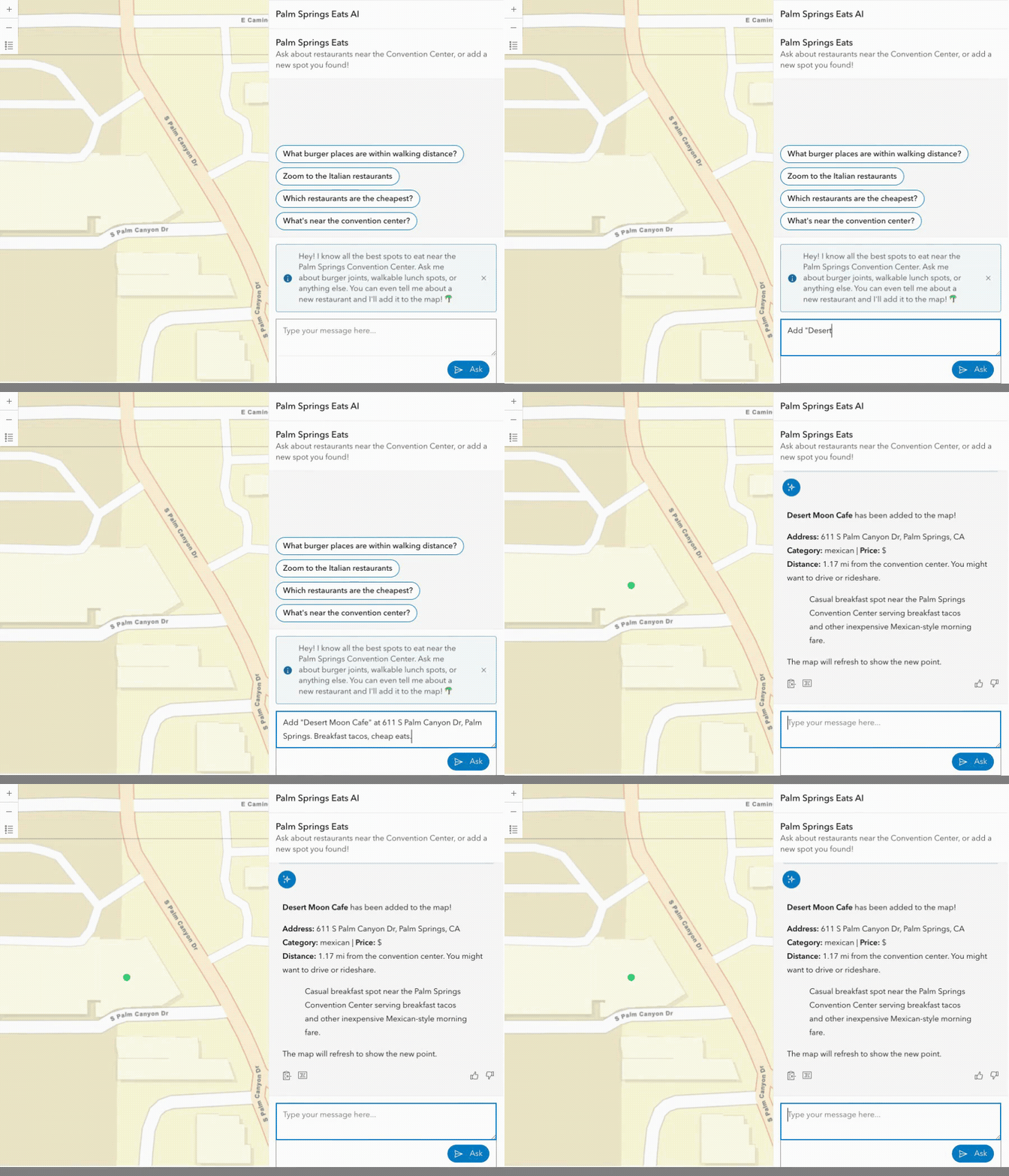
A user types something like "Add Lulu California Bistro at 200 S Palm Canyon Dr, great patio and cocktails" — the orchestrator routes to the restaurant-adder agent, which extracts structured data, geocodes the address, calculates walking distance (0.64 mi — walkable!), writes the feature to the hosted layer, and returns a confirmation. All the trace messages show up in the assistant's log panel in real time.
The TL;DR of it all
- The developer experience is quite nice! All of the built-in agents are web components and appear as HTML elements that you can declare in markup. Adding your own custom agents (the right way, not my lazy way) means mixing and matching them in different use cases. That is a very composable SDK!
- Esri gave us access to the full LangGraph integration, all the power we need for production-grade agent orchestration.
- The AI utility functions are a hidden gem. Things like
invokeStructurePromptmake it so easy to integrate and build applications on Esri’s managed LLM architecture. I can see this lowering the barrier to many AI use cases. - Based on the description of the agent, the orchestrator contract is an elegant LLM-based solution for selecting the correct agent, with strong separation between agents, execution, and error handling.
The first rule of being good at AI is use AI
The @arcgis/ai-components package is on npm. You'll need an ArcGIS Online org account with the AI assistants privilege enabled by your admin. Start with the built-in agents; they work great out of the box.Then, look at the custom agent API when you're ready to build something specific to your workflow.
The full source code for Palm Springs Eats (AI) is on GitHub: https://github.com/morehavoc/palm-springs-eats-ai
Newsologue
- Anthropic’s Claude goes to Space (kind of)! Claude helped plan the route for the Mars Perseverance Rover, and it was actually useful!
- The Pentagon (Department of Defense/War) labeled Anthropic a supply chain risk. Honestly, this is a political hot mess that I don’t want to touch. Sam A. of OpenAI has stepped in to replace Anthropic, and claims to have equivalent desires to Anthropic, but the contract language isn’t very strong. The whole problem stems from Anthropic not wanting its AI to be used to autonomously kill people. That seems reasonable. I'm not sure I trust OpenAI as much as I do Anthropic.
- MCP Adoption is outpacing security controls. Yup. I mean, to be fair, we don’t have good security on lots of things. For example, I would really like to give an AI read-only-with-write-draft-but-never-send-or-delete access to my email, but that just isn’t there yet.
Epilogue
This week started as an exploration of the new API. Claude helped me keep track of various things and then I turned that into this post. Holly edited. Claude also helped a lot with the code for the example app, and with drafting LinkedIn posts.