
Prologue
Last week, I was in upstate New York for the New York State Geospatial Summit—which was a ton of fun; thanks again, everyone—in a little town called Skaneateles. The first thing I learned when I arrived was that you pronounce that word “Skinny Atlas,” which is amazingly convenient for a mapping person to remember!
I was there for more than just enjoying the wonderful weather and people; I was there to talk about AI and GIS, so I gave my “build an app in 30 minutes” session. The audience picks what we build by submitting a form, and my AI, Jaws, filters through those, combines a few, and decides what we build.
This time we built a simple web app that routes you between wineries in the Finger Lakes, tells you about good viewpoints, etc. It was super fun, and the folks there were wonderful and played my reindeer game so well that there were something like 40 different app ideas. Everything from a map of every fair in New York State to an app that finds you a free parking spot to a map of cideries you can bike to from the canal.
One of them stood out to me because it’s something I’ve needed before: a driving navigation app that overlays the National Weather Service forecast on your route and tells you when you’ll actually run into weather.
So, this week in Tech Office Hours, we built that!
It also turned out to be a good answer to a question someone in the audience asked me in Skinny Atlas. It was something like, “How do I trust the answers Claude makes from data?” It's a good question, and a simple weather app is a nice place to start answering it!
TL;DR - You can trust the answers an AI gives you from data when you set it up to be trustworthy: give it the right data (read-only), give it the right tools, and make its choices obvious. We built a weather-aware road trip planner in about 15 minutes to show how.
Stormologue
As usual, I started with a vanilla Claude Code in a blank directory, talked out loud to my computer about what I wanted, and asked it to make a plan and ask me questions (remember: Think, Engage, Test). A few (about 15) minutes later, we had a working app.
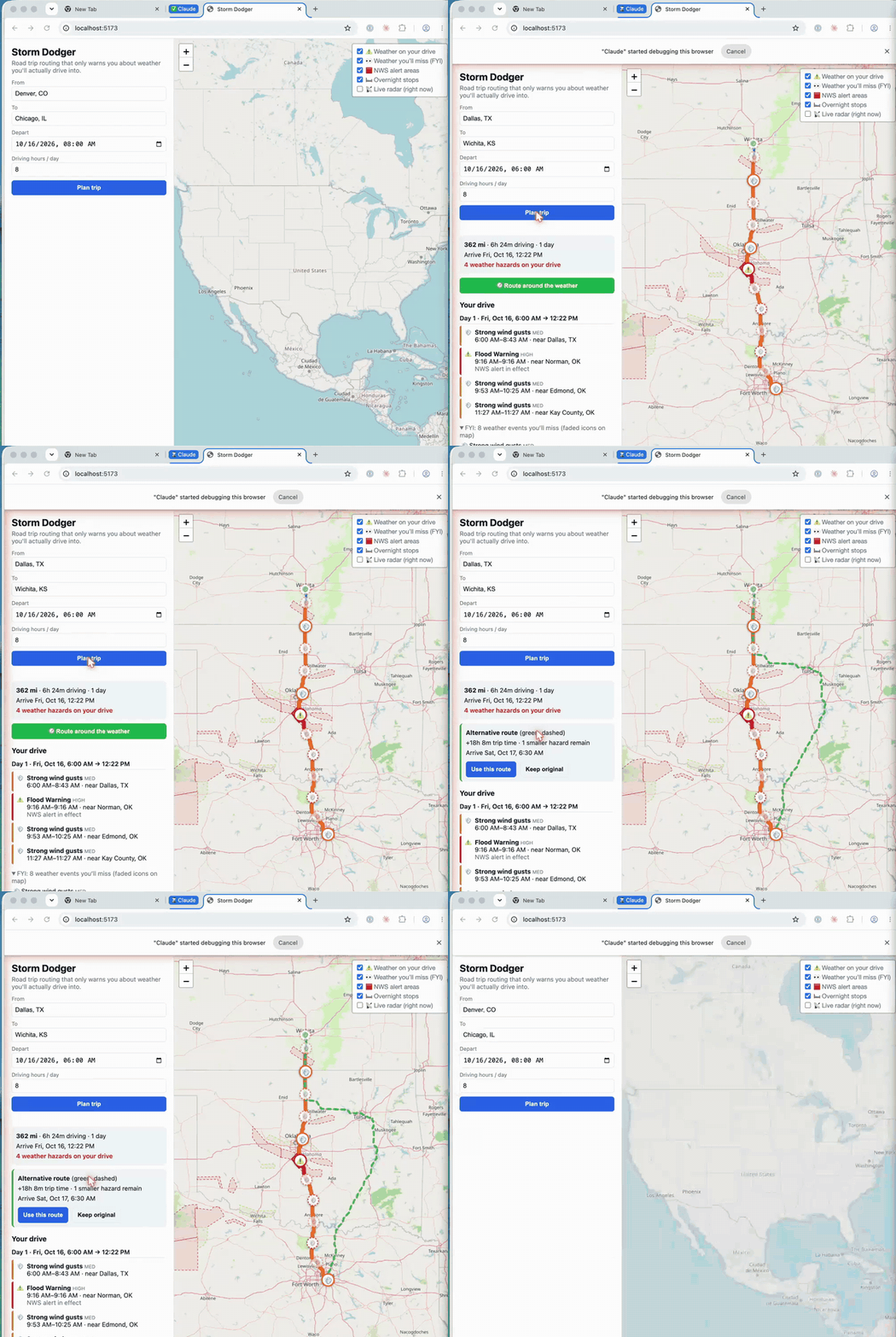
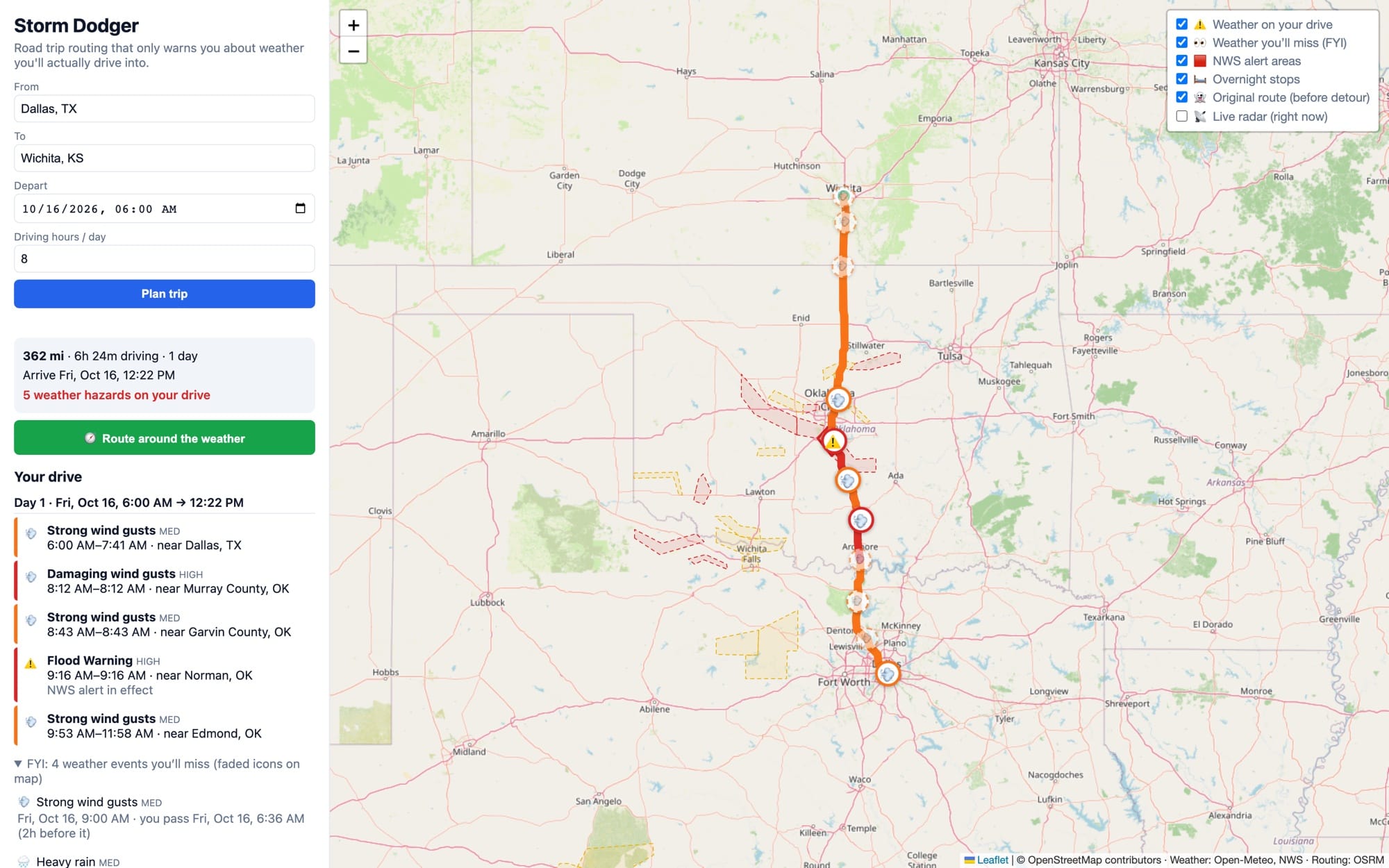
It ended up pretty simple (I think this app could be pretty complex, so doing more thinking and design up front would make a better app). You enter a start and end location, when you are leaving, and how many hours per day you want to drive. It uses all of that information to make a driving route and works out where you’ll be and when (including overnight stops). Then it checks the forecast for the places and times along your route and warns you about weather you might drive through.
How do you trust it?
Learning how and when to trust AI-generated output is important. The models are getting better and better, but they still make mistakes (just like we do). Here is how I would decide whether to trust Storm Dodger's output.
1. Give it the right data (and not much more)
Storm Dodger uses four public sources:
- OpenStreetMap and OSRM for the route
- Open-Meteo for the forecast
- The National Weather Service for alerts
- RainViewer for radar
Each of those datasets helps answer part of the question at hand, and there isn’t extra data for the AI to be confused by. To make it even safer, the Storm Dodger app doesn’t have any AI in it at all! It's deterministic code! The only place we need to keep an eye on is building the application to make sure the AI doesn’t misuse or misunderstand the data.
2. Make the data read-only
Storm Dodger doesn’t need to update any of this data, so Claude doesn’t need to update any of this data. We can trust the source data because we trust the sources; the AI is just consuming it. In this case, the AI isn’t even directly consuming the data after the application is built. If you are building something like an AI agent, use this read-only rule just like we did in Episode 86.
3. Give it real tools to compute the answer
In our case, we need routing and some basic GIS tools like point-in-polygon. These tools already exist, and most mapping libraries have them, so our AI doesn’t need to invent them; we just need to give it access. Claude wrote that code once; we test and validate it, and then we can rely on it.
When building a tool that uses AI, like our agent last week, if you give the AI the spatial tools it needs, it is much more likely to give you the right answer because it doesn’t have to guess; it can compute!
4. Make its choices obvious
During the livestream, I did this without even thinking about it at the time. As soon as the app was working, I immediately wanted to understand why the app had made decisions. I asked for the weather to be on the map and for the original route to still be drawn, so I could see what we were avoiding.
If you can see why the app (or the AI) made a choice, you can check it. And if you can check it, you can trust it.
It isn’t done, but if I were going on a road trip tomorrow, I would be pretty happy with it. It would help me gather the information I want in one place, choose a route, and make the final decisions. It would help me make the final decisions.
It could even let me refresh it the next day to see what had changed. This kind of human decision support is the best outcome. I am not trusting the AI on its own; I’m trusting the data, the tools, and the choices (because I can see why they were made), and the final decision is still up to me.
Newsologue
(Written by Jaws)
- OpenAI posted 719 AI-written math papers on 372 open problems, and only about 42% have been formally checked so far. Three were already withdrawn over a sign error. I think the hard part has moved from writing the proof to checking it.
- One developer used Claude to build open-source clones of seven Adobe apps, and the repo passed 63,000 GitHub stars in about two weeks. He calls it a clean-room build, but a clean room usually means two separate teams, not one person and an AI. Copyright protects code, not the idea of an app, and I expect that line to get tested.
- Anthropic researchers got an AI model running split across 15 cheap Android TV boxes, slowly, and in a simplified test it spread to every box in 4 of 5 tries. They made the hacking step easy on purpose, so this is a warning, not an outbreak (and yes, Anthropic makes the model I run on). Keep your smart devices updated and on their own Wi-Fi.
Epilogue
Jaws wrote the first draft of this from the office hours recording, then I rewrote it. During the livestream, Claude Code built the app while I talked about various AI things. Afterward, Jaws set it up and pushed it to a GitHub repo so you can all see it, if you want. Jaws also made the GIF, took the fresh screenshots, wrote the README, and did the news.