Episode 56 - The Levels of AI Assisted Software Development
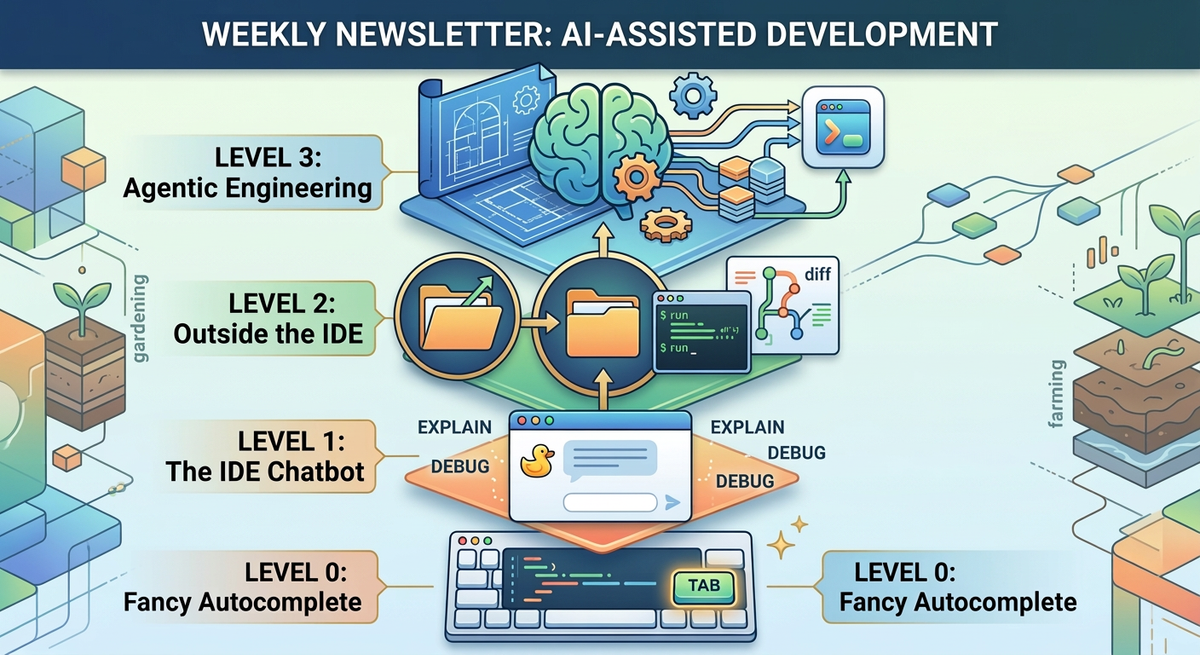
There are four levels of AI coding available today, from fancy autocomplete to full agentic engineering. The interesting stuff starts at Level 2. And Level 3 is where it gets weird.
Prologue
This week, I was at the Esri Developer and Technology Summit (a.k.a. Dev Summit) talking to folks, exchanging AI experiences, laughing at failures, and generally having a good time with my fellow technologists.
Personally, my talk where I used AI to build an app from scratch in just 15 minutes using an “Agentic Engineering” process was the high point. The audience submitted ideas, Claude synthesized them into an urban heat island mapping app, and we built it live on stage. We laughed, we cried (okay, maybe that was just me) but Claude came through and we built a working application.
I started this week talking about the “Four Levels of AI Assisted Development” and while this isn’t a perfect framework, I do think it is a reasonable way to think about what we can already do with AI development tools, and maybe what we can see in the future.
TL;DR - There are four levels of AI coding available today, from fancy autocomplete to full agentic engineering. The interesting stuff starts at Level 2. And Level 3 is where it gets weird.
Levelologue
I don’t much care for the term Vibe Coding so I started thinking about other ways to frame it. Agentic Engineering is a good start, but there is more to it than that. I think it is more like an onion, there are layers of leverage and complexity that we can distill down into levels. Right now there are four levels (I have a separate thought on the next level that I’ll share soon).

To which the reply is probably: 🤷 six seven.
Level 0: Fancy Autocomplete ⌨️
You write a function signature, and the AI fills in the body. Or you write a comment describing what you want, and it generates the code below it. GitHub Copilot in its original form. Tab-tab-tab.
This is genuinely useful! It saves keystrokes. But you're still reading every line it produces. You're still the one deciding what to build, where to put it, and whether the suggestion is any good. The AI is a faster keyboard, not a collaborator.
Level 1: The IDE Chatbot 🦆
This is where you have a chat panel inside your development environment (IDE—Integrated Development Environment). You can ask it questions, paste in code, and have it explain things. It can see the file you're working on and usually the other files you have open.
The difference from Level 0 is that you're having a conversation, not just accepting suggestions. But you're still deeply involved in writing the code. You're still the architect, the debugger, the decision-maker. The AI is a little like a rubber duck that talks back.
Level 2: Outside the IDE 🎬
This is where things start to shift. At Level 2, you’re no longer inside your development environment! You might still open an IDE chat, but fundamentally you don’t need to look at every line of code anymore. You’re giving commands to an AI that goes off and makes changes across your whole project. You are still actively chatting with the tool, going back and forth and giving out tasks, but the tasks are larger and might impact more of the entire application (not just one file).
Claude Code lives here. So does Cursor's agent mode, Windsurf, and a few others. The AI can see your entire codebase, run terminal commands, execute tests, fix its own mistakes. You're more of a director than a typist.
At this level, you stop thinking about lines of code and start thinking of capabilities, but you also still tell the AI how you want something done.
Level 3: Agentic Engineering 🧠
At Level 3, you give the AI a plan and let it go off and execute it autonomously. You're not chatting with it in real time. You're not reviewing every change as it happens. Instead, you hand it a goal and come back later to see what it built.
This is where it gets genuinely weird. Because at this level, the AI isn't just writing code for you; it's making architectural decisions, choosing libraries, writing tests, debugging failures, and iterating on its own work. You start to act more like a product manager than a developer. Of course, you might still (and in some cases should) dictate the requirements, the user stories, software libraries you have access to, packages you prefer or are certified, etc. Your job becomes figuring out what the application should do and building the design document, or the plan.
This is where my three step plan fits: Think, Engage, Test. You think—decide what you want, and how it should look and behave, and then you create a plan. You can even use AI for that step too! Then you engage the AI in the build process; you let it do some basic testing, and then you test. Your job becomes to verify the software: does it do what you wanted? Does it look right? Is this the solution the customer needs?
I have been living at this level for a few months now. Most everything I do starts with a description or a plan of what I want, and sending Claude off to work on it. It might be a research task or a prototype or even taking pictures of slides in plenary sessions and having it index and categorize information for me.
It requires trust, and understanding the consequences. The AI needs to deeply understand your codebase, your conventions and your intent. It might require you to build additional documentation! But when it works, it fundamentally changes your relationship with code. You stop being a developer and start being something else. I’m not sure I have a word for it yet, but it isn’t “Vibe Coder.”
I've been writing this newsletter for a year, and pushing the boundaries of coding with AI for even longer. If you're new to coding with AI, maybe you're still building your prompting skills and trust in AI to execute, but don't be afraid to dive in, at any level. And, if you want to connect with others on this path, come to my Tech Office Hours (every Third Thursday!). The next one is March 19.
Newsologue
- Perplexity launches their “Computer” product. I don’t know if it works, but I think this is the beginning of a new generation of AI powered tools with deep integrations into many systems.
- Related, Microsoft launches “Copilot Cowork” which is maybe a wrapper on Anthropic’s Cowork tool. This stuff is moving really fast.
- Anthropic launches a new Code Review tool. We haven’t tested it, but we’ve been experimenting with our own tools like this, probably some hybrid of their broad expertise and our narrow expertise is really going to speed up the review of AI generated code (Level 3)!
Epilogue
The future is about building solutions, not writing code. I believe that this will take the form of gardening or farming not factory work. I will save that for a future newsletter.
This episode started as some notes on paper, then a video on LinkedIn where I walked around Palm Springs California. Then my AI assistant, Jaws, drafted it from the video. Although the structure was right, the voice wasn’t, so I worked to re-write it. Then Holly edited.